Structs
A struct is a collection of named value fields accessed with the .
operator. In addition to being returned by some internal and FFI
functions, like query, named struct types can be defined by the user.
Named structs are also defined by Commands, Effects, and Facts (see
Struct Auto-definition below).
A struct literal is the name of the struct, followed by a series of field definitions enclosed in curly braces. All fields must be specified, either through direct field definitions or via Struct Composition.
// user-defined structs
struct Bar {
    c string,
    d bool,
}

struct Blonk {
    d bool
}

command Foo {
    fields {
        a int,
        b struct Bar,
    }
}

action make_foo() {
    let x = Blonk { d: false }
    // `struct Foo` is automatically defined by `command Foo`
    let cmd = Foo {
        a: 2,
        b: Bar {
            c: "hello",
            // Bar's `d` field is pulled from `x.d`
            ...x
        },
    }

    publish cmd
}

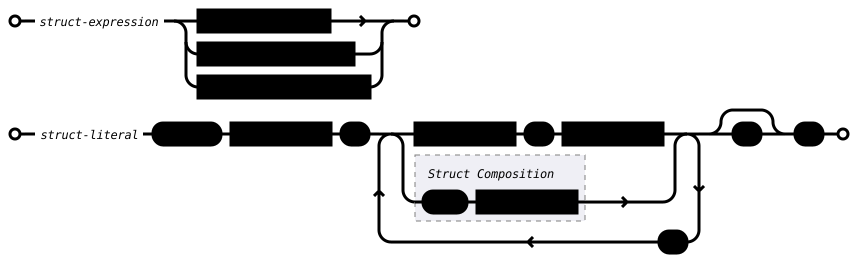
Struct Auto-definition
Commands, Effects, and Facts auto-define a struct with the same name.
Commands define a struct whose fields match its fields block. Effects
define a struct whose fields match its effect block. Facts define a
struct whose fields are the combination of its key and value fields. For
example:
command Foo {
    fields {
        a int,
        b string,
    }
}

function make_struct_foo() struct Foo {
    return Foo {
        a: 3,
        b: "foo",
    }
}

effect Bar {
    x int,
}

function make_struct_bar() struct Bar {
    return Bar {
        x: 5,
    }
}

fact Baz[x int]=>[y string]

function make_struct_baz() struct Baz {
    return Baz {
        x: 5,
        y: "Baz",
    }
}
Struct Definition Field Insertion
When defining a struct, you can refer to a previously defined struct to insert those field definitions into your struct.
struct Foo {
    a int,
    b bool,
}

struct Bar {
    +Foo,
    c string,
}
Defines Bar equivalently to specifying fields a, b, and c
explicitly. This also works in command fields:
command Baz {
    fields {
        +Bar,
        d optional bytes,
    }
    ...
}
Fields are inserted in the order specified by the referenced struct. Expansion happens as the struct is compiled. You can only refer to a struct that has been previously defined (though because commands may be compiled in a later pass, all structs may be defined at that point). Multiple references can be made, and they can be inserted anywhere in the struct.
Duplicate fields from referenced struct definitions are a compile error, e.g.
struct A { a int }
struct B { +A, a int }
Struct B will cause an error because a is already defined in A.

Isomorphic Struct Conversion
If two structs have fields with the same names and types (but not
necessarily the same order), they are isomorphic. A struct can be
converted to a second isomorphic struct type with the as operator. For
example, this can be used to easily convert an arbitrary struct to a
command struct:
struct Foo {
    a int,
    b string,
    c bool,
}

command Bar {
    fields {
        a int,
        c bool,
        b string, // order is not important, just names and types
    }
    ...
}

action frob(f Foo) {
    // external::foo_creator() returns a Foo
    let b = external::foo_creator() as Bar
    publish b
}

Struct Composition
A struct A whose fields are a strict subset of the fields of struct
B can be inserted into struct B with the struct composition operator
....
struct Foo {
    a int,
    b string,
}

struct Bar {
    a int,
    b string,
    c bool,
}

action frob(x Foo) {
    let b = Bar {
        ...x,
        c: false,
    }
}
As noted earlier, the resulting struct must have all fields specified. Struct composition can be used more than once in the same struct literal, but the fields in the source structs cannot overlap.
struct Baz {
    a int,
    b string,
    c bool,
    d id,
}

action fnord(x Foo, y Bar, user id) {
    let b = Baz {
        ...x,  // invalid as both Foo and Bar define fields `a` and `b`
        ...y,  // and it is not clear which source struct they come from
        d: user,
    }
}
Struct Subselection
A struct A whose fields are a subset of the fields of struct
B can be assigned from struct B with the struct subselection
operator substruct.
struct Foo {
    a int,
    b string,
}

struct Bar {
    a int,
    b string,
    c bool,
}

action frob(x Bar) {
    let f = x substruct Foo
}
