Introduction
This document describes version 2 of the policy language.
Named Values
A “named value” is what you might call a “variable” in other languages. The distinction is important, though. Aranya Policy Language is a static single assignment language. In a particular scope, a named value is defined once and never mutated. Some values may be predefined in some scopes, or inherited from enclosing scopes.
let x = 3
let x = 4  // Error - cannot redefine `x`
if foo is None {
    let x = 5  // Can't shadow in an inner scope, either.
    let y = x + 1  // `x` is inherited from the enclosing scope
}
Automatically defined named values
In some contexts, there are names automatically defined by the runtime.
- In
policy,recall, andsealblocks, the fields of the command are available via the namethis, which is of typestruct <CommandName>. - In
policy,recall, andopenblocks, the envelope of the command is available via the nameenvelope, which is an opaque type accessible via theenvelopeFFI.
Scope
Global Scope
Variables can be defined in global scope, which makes them available to all other expressions in the language. This is commonly used to define certain operational constants that will be used repeatedly. See Global Values for more information on what is allowed in global scope.
let MAX_RETRIES = 3

function retry_thing() bool {
    let state = unwrap_check query State[]=>{retries: ?}
    return state.retries > MAX_RETRIES
}
Blocks
Named values are scoped to blocks. A block is usually anything enclosed
in curly brackets that contains statements
– a function, an action, a command policy block, an if statement
block, a block expression, etc.
let in an enclosing block is scoped
to that block. Using such a definition outside of that block will cause
a compile error.
action foo(x int) {
    if x == 1 {
        let y = 4
        publish Foo { y: y }
    }
    // This is an error - y does not exist in the outer scope
    publish Foo { y: y }
}
Resolving an identifier traverses upwards through enclosing scopes. The global scope is the last scope in this search and is always present.
let assignments cannot assign to any names already resolvable in the
current scope. Shadowing an existing identifier this way is a compile
error.
action foo() {
    let x = 1
    if x == 1 {
        // This is an error - x is already defined
        let x = 4
    }
}
Commands and the Graph
The core functional unit of the Aranya Policy Language is the Command. A command defines a set of data and the rules for processing that data in order to add it to the Graph.
Commands
Let’s consider this command:
command AddBalance {
    fields {
        user id,
        amount int,
    }

    policy {
        check amount > 0
        let account = check_unwrap query Account[id: this.user]=>{balance: ?}
        let current_balance = account.balance
        let new_balance = current_balance + this.amount

        finish {
            update Account[id: this.user] to {balance: new_balance}
        }
    }

    ...
}
There are some more required parts here (see the
reference), but we’ll omit them for
brevity. First, the command has fields, which define the data stored
in the command. And next it has policy, which is run both when the
command is created in the local graph and when it is synced to other
devices’ graphs. It checks the validity of the data, then finally
updates the state of the system.
Note the use of the automatically defined name this, which refers to
the fields of the command currently under evaluation.
A sequence of these commands will progressively update an account balance. We’ll dive into the details of this state mechanism later in Facts.
The Graph
Each command refers to its ancestor(s) (except for the first), creating a directed acyclic graph we simply call “the graph”. Here is a simple graph with six commands.
graph RL;
A(A); B(B); C(C); D(D); E{{E}}; F(F);
F --> E --> C & D --> B --> A;
A is the root, or the “init” command. B’s parent is A, and both C and D’s parent is B. Command E is a “merge command”, which has both C and D as parents. Merges are automatically created by Aranya after syncing. They rejoin divergent graph segments so that commands can be added linearly afterwards. F’s parent is then the merge commit E.
The Braid
The graph above is a complete view of the system, but a graph with branches introduces ambiguity about how commands affect state. Does C or D evaluate first? To solve this, Aranya creates a total ordering with the “braid function”, which deterministically flattens the graph so that it can evaluate commands linearly.
But how does this ordering happen? Without any more information, the braid function just makes an arbitrary decision1. Let’s say for the sake of demonstration that this decision is “alphabetical order” so C comes first. Then this looks like:
graph RL;
A(A); B(B); C(C); D(D); F(F);
F --> D --> C --> B --> A;
But it could just as easily have ordered them via another metric to get:
graph RL;
A(A); B(B); C(C); D(D); F(F);
F --> C --> D --> B --> A;
The order of commands can be influenced by adding a priority value to
the command’s attributes block.
command C {
    attributes {
        priority: 10,
    }
    ...
}
This higher priority would tell the braid function to always order C before B.
We’ll talk a bit more about how this ordering affects state later in Facts.
-
It actually orders them based on their command ID, which is a hash derived from their serialized contents. ↩
Facts
Facts are a kind of database embedded in the Aranya runtime. They keep track of a fairly standard key/value store, but they are modified as a consequence of running policy commands. And because the graph can branch, the value of a fact depends on what commands currently exist in your graph.
Let’s expand on our account balance example from earlier. Here is a fact that keeps track of an account balance value per user.
fact Account[user id]=>{balance int}
The fields on the left of => between square brackets are the key,
and they are used to look up facts in the database. The fields to the
right in curly brackets are the value, which just hold the data
associated with the key.
Now let’s write some commands that manipulate these facts. First, we need to initialize the fact to something.
command Enroll {
    fields {
        user id,
    }

    policy {
        check !exists Account[user: this.user]

        finish {
            create Account[user: this.user]=>{balance: 0}
        }
    }
}
This command first checks that no
fact exists using
exists.
exists returns a boolean for whether the fact exists in the fact
database. Since we’re creating a new fact, we want to ensure that it
doesn’t exist yet. Then in the finish block we use
create to create the fact with
the user value coming from the user field in the command, and an
initial balance of zero.
To change this balance, we’ll use the command we created earlier.
command AddBalance {
    fields {
        user id,
        amount int,
    }

    policy {
        check amount > 0
        let account = check_unwrap query Account[id: this.user]=>{balance: ?}
        let current_balance = account.balance
        let new_balance = current_balance + this.amount

        finish {
            update Account[id: this.user] to {balance: new_balance}
        }
    }

    ...
}
We first check that the amount being added is greater than zero. Then we
fetch the current balance using
query. Note the
use of the bind marker ? in the value side of the fact
description1. This tells query that you don’t care
what that value is. And indeed, that’s the value we’re looking for when
we fetch this fact.
We use
check_unwrap
to unwrap the optional given to us by the query. If the optional is
None, check_unwrap exits with a check
failure. check and
check_unwrap should always be used to check the preconditions of a
command. Next we update the balance, and finally in the finish block
we use update to change the value
in the fact database.
And finally, let’s write a command that does something with this.
effect WithdrawalResult {
    completed bool,
    remaining_balance int,
}

command Withdrawal {
    fields {
        user id,
        amount int,
    }

    policy {
        let account = check_unwrap query Account[user: this.user]
        let completed = account.balance >= this.amount

        if completed {
            let new_balance = account.balance - amount_withdrawn
            finish {
                update Account[user: this.user] to {balance: new_balance}
                emit WithdrawalResult {
                    completed: true,
                    remaining_balance: new_balance,
                }
            }
        } else {
            finish {
                emit WithdrawalResult {
                    completed: false,
                    remaining_balance: account.balance
                }
            }
        }
    }
}
This command uses the balance stored in the fact database and checks
whether it is at least as much as the amount requested. If it is, it
updates the balance and reports a WithdrawalResult effect to the
application with completed: true and the new balance.
If there isn’t enough money in the account, no account update happens
and a WithdrawalResult is emitted that explains this result.
Exploring Alternate Realities
Now that we have our commands, let’s see what happens if we issue a
series of them. I’ll omit the user field in these commands for the
sake of brevity.
graph RL;
A(Enroll);
B("AddBalance { amount: 10 }");
C("AddBalance { amount: 100 }");
D("Withdrawal { amount: 50 }");

D --> C --> B --> A;
This is a linear sequence of commands. We start with enrolling, then we
add a balance twice, then we withdraw 50, which according to our rules
should succeed and emit WithdrawalResult { completed: true, remaining_balance: 60 }.
Let’s suppose that instead the graph looks like this:
graph RL;
A(Enroll);
B("AddBalance { amount: 10 }");
C("AddBalance { amount: 100 }");
D("Withdrawal { amount: 50 }");
M{{M}};

D --> M --> B & C --> A;
Where AddBalance { amount: 10 } and AddBalance { amount: 100 } were
created in parallel branches. Here M is the “merge command” we learned
about in Commands and the Graph. And
Aranya then uses the braid function to
turn this into a linear sequence of commands so we can calculate the
final facts in D. Here it doesn’t matter which AddBalance comes
first. We’ll always have a sufficient balance to satisfy the
Withdrawal after the merge.
But sometimes order does matter. Suppose we had this instead.
graph RL;
A(Enroll);
B("AddBalance { amount: 10 }");
C("AddBalance { amount: 100 }");
D("Withdrawal { amount: 50 }");
M{{M}};

M --> D & C
C & B --> A
D --> B
Now which branch comes first determines whether the Withdrawal command
succeeds or fails. Because if we order it the top branch before the
bottom one, it’s like before. But if it’s the other way around, we only
have one AddBalance before the Withdrawal and it will produce
WithdrawalResult { completed: false, remaining_balance: 10 }2.
As we discussed earlier in The Braid, we
could add a priority value to make this less ambiguous. If we gave
AddBalance a higher priority than Withdrawal we would have an
optimistic solution that orders both AddBalances before Withdrawal.
If we gave Withdrawal a higher priority, we’d have a pessimistic
solution that would order AddBalance { amount: 100 } after the
Withdrawal. You probably want the optimistic solution here, but there
is generally no one correct solution for ordering commands and how you
set priorities depends on your application.
Using Keys and Bind Markers
The query engine in the fact database can match on partial keys using
the bind marker, but it has important constraints. First is that any
bound key fields must be strictly to the right of any concretely
specified key fields (see Bind
Marker). The
second is that it will always query by sorted key
order. The fact returned by
query is the first ordered fact matching the key fields. Likewise, the
order of facts iterated by map is
the key sort order.
It is tempting to think that because you can use bind markers on the value side that they offer the same kind of lookup functionality. For example, take this very ordinary fact definition for a set of users:
fact Users[user id]=>{level enum AuthorizationLevel}
You can, of course, find the authorization level of a particular user.
query Users[user: this.user]=>{level: ?}
But trying to do the opposite – finding a user with the given authorization level – won’t work as you expect.
query Users[user: ?]=>{level: AuthorizationLevel::Admin}
Why not? Anything on the value side of a query is only matched against the first fact that the key side finds. This query means “find the first user with any user ID, and if that user’s level is admin, return it.” It does not mean “find the first user whose level is admin”. To do the latter query, you will have to create a fact with both fields as keys and no values.
fact UsersByAuthorization[level enum AuthorizationLevel, user id]=>{}
Now you can query on the level field and find the first user at that level.
query UsersByAuthorization[level: AuthorizationLevel::Admin, user: ?]
This generally means that if you want to query on multiple fields, you will have to create and maintain multiple facts as different indexes to retrieve that data.
-
If all of the value fields are bound, you can shortcut this and omit the value side entirely:
query Counter[user: this.user]. ↩ -
Braid order isn’t actually a branch-to-branch choice. The resulting order could have interleaved
AddBalance { amount: 100 }betweenAddBalance { amount: 10 }andWithdrawal { amount: 50 }. ↩
File Format
The policy document is a Markdown document with YAML front matter (as
defined by Jekyll). Front
matter is delimited by --- markers before and after. And, as the name
implies, it must exist at the head of the document. The YAML metadata
must specify a policy-version key for the version of the policy
language used.
---
policy-version: 2
---
... document follows
Only code inside code blocks marked with the policy
info-strings
are parsed as policy code. Everything else is ignored.
# Title

Some explanatory text

```policy
// This is policy code
fact Example[]=>{}
```
Basic Syntax
Whitespace
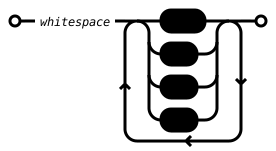
Whitespace is not significant in Aranya Policy Language. Whitespace is
any sequence of spaces, tabs, and newlines (which includes \n, \r\n,
and \r).
Comments
Comments are C99-style, supporting both block comments(/* */) and
line comments (//). Block comments do not nest.
/* This is a block comment
   It can span multiple lines
 */
function foo() {
    // This is a line comment
    let x = query Foo[]=>{x: 3}
}

Identifiers
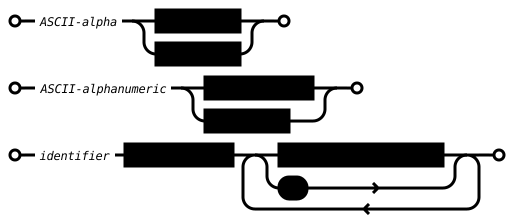
Identifiers are the names of items in the language - commands, actions, variables, etc. An identifier must start with an ASCII alphabetic character, followed by zero or more ASCII alphanumeric characters or underscore.
Reserved words
Identifiers cannot use names defined by the language, including types
(int, string, etc.), top-level declarations (command, emit,
etc.), statements (check, let, etc.), and expressions (query,
if, etc.).
Types
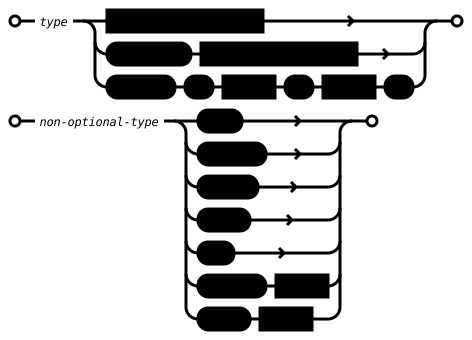
Aranya Policy Language supports several basic and structured types. Notably, it does not support any collection types.
Basic Types
int
A 64-bit two’s complement signed integer. It represents whole numbers from -9223372036854775808 to 9223372036854775807.
let x = 3
let y = -42
let z = 1048576

bool
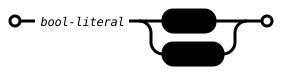
A boolean. true and false are literal bool values.
let is_cool = true
string
A UTF-8 encoded string with no internal null bytes.
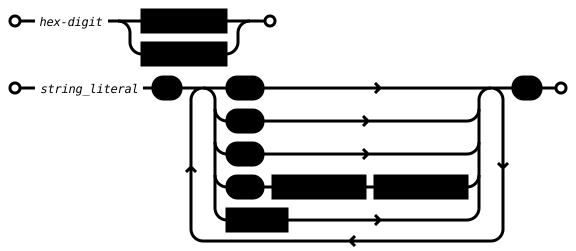
Literal string values are surrounded by double-quotes ("). String
literals support escapes for \n, \", \\, and two-digit hex escapes
\xNN.
let s = "Hello my name is \"Fred\""
let t = "Control Characters:\n STX \x01 BEL \x07"
//let u = "Null-terminated\x00"  // internal null byte not allowed!
bytes
Bytes represents an arbitrary byte sequence. It is similar to a
string, but it provides no validation for its contents, nor any way to
specify a literal. The id type below is similar, but fixed-length and
should be preferred specifically for identifier types.
id
An opaque type for object identifiers. It is not possible to specify
literal ids.
Optional Types
A type which can contain a value (Some) or no value (None). The type
of the value is specified after optional, e.g. optional int. The
literal expressions for optionals are None and Some(❮expression❯).
// declare an optional field
effect Foo {
     a string,
     b optional int,
}

// initialize an optional
// type of these player variables is `optional string`
let player1 = Some("George")
let player2 = None

// access inner value
// type of `winner` is `string`
let winner = unwrap player1
// This will terminate execution with a runtime exception
let winner = unwrap player2

Result type
A type that represents either a success (with an associated value), or a failure with a value descripbing the error . A result[T, E] is either Ok(v), where v is a value of type T produced on success, or Err(e), where e is a value of type E describing the failure. Result values can be inspected with a match to extract the inner value or propagate the error.

Example
Function that returns a result:
function get_value(n int) result[int, string] {
    if n > 0 {
        return Ok(n)
    } else {
        return Err("invalid n")
    }
}
Matching
Result values are handled with match statements or expressions:
function foo() result[int, string] {
    let n = match get_value() {
        Ok(0) | Ok(1) => 1
        Ok(n) => do_something(n)
        Err(msg) => return Err(msg)
    }
    // At this point, `get_value` succeeded, and `n` holds an int value
    return Ok(n)
}
Match pattern restrictions
Literal and binding patterns can be used together, but with some restrictions:
- A literal pattern cannot appear after a binding pattern, e.g.
// okay Ok(5) => Ok(n) => // invalid Ok(n) => Ok(5) => // this is unreachable - Literal and binding patterns cannot be mixed in the same arm. E.g.
Ok(5) | Ok(6) // okayOk(5) | Ok(n) // invalid - binding (n) matches all values, so the literal is redundant
Nesting
Results can be nested: result[result[int, string], enum Error]. They can also be combined with optionals, e.g. result[option[int], enum Error].
Structs
A struct is a collection of named value fields accessed with the .
operator. In addition to being returned by some internal and FFI
functions, like query, named struct types can be defined by the user.
Named structs are also defined by Commands, Effects, and Facts (see
Struct Auto-definition below).
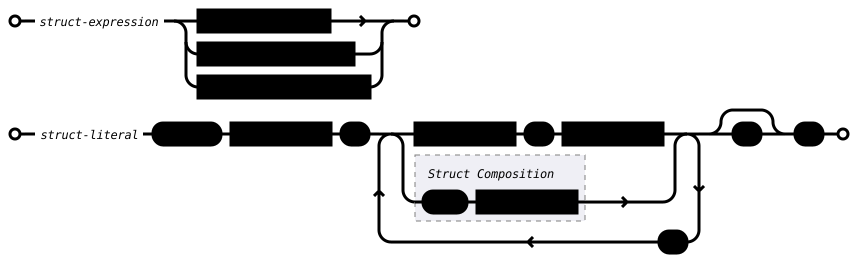
A struct literal is the name of the struct, followed by a series of field definitions enclosed in curly braces. All fields must be specified, either through direct field definitions or via Struct Composition.
// user-defined structs
struct Bar {
    c string,
    d bool,
}

struct Blonk {
    d bool
}

command Foo {
    fields {
        a int,
        b struct Bar,
    }
}

action make_foo() {
    let x = Blonk { d: false }
    // `struct Foo` is automatically defined by `command Foo`
    let cmd = Foo {
        a: 2,
        b: Bar {
            c: "hello",
            // Bar's `d` field is pulled from `x.d`
            ...x
        },
    }

    publish cmd
}

Struct Auto-definition
Commands, Effects, and Facts auto-define a struct with the same name.
Commands define a struct whose fields match its fields block. Effects
define a struct whose fields match its effect block. Facts define a
struct whose fields are the combination of its key and value fields. For
example:
command Foo {
    fields {
        a int,
        b string,
    }
}

function make_struct_foo() struct Foo {
    return Foo {
        a: 3,
        b: "foo",
    }
}

effect Bar {
    x int,
}

function make_struct_bar() struct Bar {
    return Bar {
        x: 5,
    }
}

fact Baz[x int]=>[y string]

function make_struct_baz() struct Baz {
    return Baz {
        x: 5,
        y: "Baz",
    }
}
Struct Definition Field Insertion
When defining a struct, you can refer to a previously defined struct to insert those field definitions into your struct.
struct Foo {
    a int,
    b bool,
}

struct Bar {
    +Foo,
    c string,
}
Defines Bar equivalently to specifying fields a, b, and c
explicitly. This also works in command fields:
command Baz {
    fields {
        +Bar,
        d optional bytes,
    }
    ...
}
Fields are inserted in the order specified by the referenced struct. Expansion happens as the struct is compiled. You can only refer to a struct that has been previously defined (though because commands may be compiled in a later pass, all structs may be defined at that point). Multiple references can be made, and they can be inserted anywhere in the struct.
Duplicate fields from referenced struct definitions are a compile error, e.g.
struct A { a int }
struct B { +A, a int }
Struct B will cause an error because a is already defined in A.

Isomorphic Struct Conversion
If two structs have fields with the same names and types (but not
necessarily the same order), they are isomorphic. A struct can be
converted to a second isomorphic struct type with the as operator. For
example, this can be used to easily convert an arbitrary struct to a
command struct:
struct Foo {
    a int,
    b string,
    c bool,
}

command Bar {
    fields {
        a int,
        c bool,
        b string, // order is not important, just names and types
    }
    ...
}

action frob(f Foo) {
    // external::foo_creator() returns a Foo
    let b = external::foo_creator() as Bar
    publish b
}

Struct Composition
A struct A whose fields are a strict subset of the fields of struct
B can be inserted into struct B with the struct composition operator
....
struct Foo {
    a int,
    b string,
}

struct Bar {
    a int,
    b string,
    c bool,
}

action frob(x Foo) {
    let b = Bar {
        ...x,
        c: false,
    }
}
As noted earlier, the resulting struct must have all fields specified. Struct composition can be used more than once in the same struct literal, but the fields in the source structs cannot overlap.
struct Baz {
    a int,
    b string,
    c bool,
    d id,
}

action fnord(x Foo, y Bar, user id) {
    let b = Baz {
        ...x,  // invalid as both Foo and Bar define fields `a` and `b`
        ...y,  // and it is not clear which source struct they come from
        d: user,
    }
}
Struct Subselection
A struct A whose fields are a subset of the fields of struct
B can be assigned from struct B with the struct subselection
operator substruct.
struct Foo {
    a int,
    b string,
}

struct Bar {
    a int,
    b string,
    c bool,
}

action frob(x Bar) {
    let f = x substruct Foo
}

Enumerations
enum Foo {
    A,
    B,
    C,
}

function is_a(v enum Foo) {
    match v {
        Foo::A => return true,
        _ => return false,
    }
}
Enumerations are a set of unique identifiers grouped under a single
name. They are defined in a top level enum declaration.
An enumeration literal is the name of the enumeration and the name of the
item separated by ::. So Foo::A is the A value of Foo, and is
distinct from Bar::A.
The only valid operation you can perform with an enumeration is
equality, either through the == operator, or via the match
statement. This comparison is only valid for enums of the same type.
Comparing Foo::A to Bar::A should be a compile-time error or
run-time exception.
See also the enum top-level declaration.


Opaque Types
Some operations (primarily ones imported from FFI) may have “opaque”
types which can only be referenced but not directly manipulated. These
might be concrete types under the hood, but a well-written policy should
not depend on knowledge of their internal structure. A good example of
this is the Envelope type, use in seal and open blocks. It can
only be accessed via FFI methods.
command Foo {
    ...

    open {
        // `envelope` is auto-defined in `open` but cannot be used directly. Here
        // it is processed through an FFI function to produce a usable object.
        let obj = envelope::do_open(envelope)
        // `deserialize` is a built-in that turns a serialized `bytes` object into a
        // struct.
        return deserialize(obj)
    }

    ...
}
Expressions
Expressions are similar to C-like languages, and have similar precedence. Operations on the wrong type will produce either a compile error or a runtime exception.
Operators
In addition to these operators, parentheses (()) can be used to set
precedence explicitly. All overflow, underflow, range violations, and
type mismatches are errors and will produce a compile error or runtime
exception.
Mathematical Operators
There are no mathematical operators in the policy language. See Math Functions for safe methods to do addition and subtraction.
Numerical Comparison Operators
Integers can be compared against each other.
| Operator | Meaning |
|---|---|
> | A > B is true if A is greater than B |
< | A < B is true if A is less than B |
>= | A >= B is true if A is greater than or equal to B |
<= | A <= B is true if A is less than or equal to B |
== | A == B is true if A is equal to B |
!= | A != B is true if A is not equal to B |
Logical Operators
| Operator | Meaning |
|---|---|
&& | A && B is true if A and B are both true |
|| | A || B is true if A or B are true |
! | !A is the logical negation of A |
Struct Operators
| Operator | Meaning |
|---|---|
. | A.B accesses field B in struct A |
as | A as B creates a struct B from the fields of A only if the two struct types have the same fields |
substruct | A substruct B creates a struct B from the fields of A only if the fields of struct B are a subset of A |
Optional Operators
| Operator | Meaning |
|---|---|
unwrap | unwrap A is the value inside A if the option is Some, or else stop with a runtime exception |
check_unwrap | Same as unwrap, but stop with a check failure instead of a runtime exception |
is None | A is None is true if there is no value inside the optional A |
is Some | A is Some is true if there is a value inside the optional A |
Using is on a non-optional value will fail with a compile error or
runtime exception.
Operator Precedence
| Priority | Op |
|---|---|
| 1 | . |
| 2 | substruct, as |
| 3 | - (prefix), !, unwrap, check_unwrap |
| 4 | +, - (infix) |
| 5 | >, <, >=, <=, is |
| 6 | ==, != |
| 7 | &&, || |
Functions
Aranya Policy Language can define functions (see Function Declarations), which can be called inside an expression in the usual way.
function increment(x int) int {
    return x + 1
}

function increment_twice(x int) int {
    return increment(increment(x))
}
Functions cannot be called recursively, and any attempt to do so are a compiler error.

FFI functions can be called similarly, but must be specified with their library name.
use math

function increment_twice(x int) int {
    return math::add(x, 2)
}

In addition to these functions, there are operator-like internal functions that work similarly, described in the next subsections.
Math Functions
Addition and subtraction come in two varieties, one which returns an
optional indicating overflow/underflow conditions, and a “saturating”
version which clamps the value at the minimum/maximum values for an
int (-9223372036854775808 to
9223372036854775807). There are no “wrapping” versions of these
operations.
add(x int, y int) option[int]
add calculates x + y, returning the sum as an optional[int]. The
optional is Some(x + y) if addition succeeds without overflow or
underflow, or None if it does not.
saturating_add(x int, y int) int
saturating_add calculates x + y, returning the sum as an int.
Instead of overflowing or overflowing, it clamps the result to the
bounds of what can be represented in an int.
sub(x int, y int) option[int]
sub calculates x - y, returning the difference as an
optional[int]. The optional is Some(x - y) if subtraction succeeds
without overflow or underflow, or None if it does not.
saturating_sub(x int, y int) int
saturating_sub calculates x - y, returning the difference as an
int. Instead of overflowing or underflowing, it clamps the result to
the bounds of what can be represented in an int.
Queries and Counting
query
fact Foo[deviceID id]=>{count int}

let x = query Foo[deviceID: me]
Perform a query against the fact database, returning an optional struct containing all fields of the first matching fact. The value side of the fact must be omitted. The type of the struct returned is the auto-generated struct for the fact.
In the above example, x is an optional struct Foo with two fields,
for deviceID and count. If no facts are found, it returns None.
query is commonly used with unwrap or check_unwrap to terminate
execution immediately if the fact does not exist, or to access field
values in the returned struct if it does.
Bind Marker
In Fact queries and statements with indefinite values, the bind marker
? can be substituted to mark that a key field can be any value. This
allows more general matching to be achieved. For performance reasons,
the concrete fields must be strictly on the left. So binds should only
appear on the rightmost fields of the key. For example,
let x = query Thing[a: 1, b: ?]     // OK
let x = query Thing[a: ?, b: ?]     // OK
let x = query Thing[a: ?, b: 2]     // Not OK
A query will return one fact at most, and if more than one fact matches, the one with the lowest sorted key will be returned (see Queries and Iteration).
at_least N, at_most N, exactly N
check at_most 1 Foo[deviceID: ?]
let sufficient_admins = at_least 2 TeamAdmin[teamID: t, deviceID: ?]
let is_highlander = exactly 1 Immortals[name: ?]
at_least, at_most, and exactly are counting query functions which
return a boolean value depending on whether the fact expression
satisfies the condition. at_least requires at least the stated number,
at_most requires at most the stated number, and exactly requires
exactly the stated number of facts to exist.
The same fact key binding rules as query apply - unbound key fields
must be on the right.
exists
check !exists FooCounter[deviceID: this.deviceId]
exists is syntactic sugar for at_least 1.
count_up_to
let admin_count = count_up_to 5 TeamAdmin[teamID: t, deviceID: ?]
count_up_to counts the number of facts up to an upper bound, and
returns either the number of facts found or that upper limit.
If and Match
if
let y = if x == 3 "yes" else "no"
The if expression is a ternary operator. If the expression is true, it
evaluates to the then case, otherwise it evaluates to the else case.
Both cases must have the same type or it is a compiler error.
Not to be confused with the if statement.
match
Much like the match statement, a match
expression evaluates to one of its arm expressions based on an equality
test against an expression. If no expression matches, it matches a
default case represented by _ if it exists. If _ is not present, the
failed match causes a runtime exception.
action foo(x int) {
    let v = match x {
        3 => 1
        4 => 2
        _ => 0
    }
}
Each arm is a separate expression. Similarly to if expressions, each
subordinate expression in a match must evaluate to the same type as
the test expression or it is a compile error.
Not to be confused with the match statement.
Serialize and Deserialize
command Foo {
    ...

    seal {
        let bytes = serialize(this)
        return envelope::new(bytes)
    }

    open {
        let fields = deserialize(envelope::payload(envelope))
        return fields
    }

    ...
}
These functions turn command structs into bytes and vice versa.
serialize() takes a struct argument (of any kind) and produces a
serialized bytes representation. It can only be used in a seal
block.
deserialize() takes a bytes argument and produces a struct. It can
only be used inside a open block.
Todo
action foo(type enum Bar) {
    let x = if type == Bar::Done {
        1
    } else {
        todo()
    }
}
todo() simply exits with a runtime error. It is intended to be used
during development to stub out things you haven’t finished. It can only
be compiled in debug mode. It produces a compile error otherwise.
Block Expressions
A block expression contains zero or more statements followed by a required colon separator and terminal expression. The value of the block is the value of that terminal expression.
action foo(x int) {
    let y = {
        let v = ffi::external_value()
        : x + v
    }
}
Block expressions allow the use of statements inside an expression to
help calculate a value. In particular, they’re useful for if
expressions:
function saturated_level(level int) int {
    let result = if level > saturation_threshold then {
        let a = saturate(level)
        check a > 0
        let b = granulate(level)
        check b > 0
        : a + b
    }
}
action foo(location id, cap enum Capability) {
    let level = match x {
        Capability::Jump => {
            let user_perms = unwrap_check
                query UserJump[location: location]=>{allowed_level: ?}
            : user_perms.allowed_level
        }
        ...
    }
}
Struct Conversion
Isomorphic Struct Conversion
If two structs have fields with the same names and types, they are
isomorphic. A struct can be converted to an isomorphic struct with the
as operator. For example, this can be used to easily convert an
arbitrary struct to a command struct:
struct Foo {
    a int,
    b string,
    c bool,
}

command Bar {
    fields {
        a int,
        c bool,
        b string, // order is not important, just names and types
    }
    ...
}

action frob() {
    // external::foo_creator() returns a Foo
    let b = external::foo_creator() as Bar
    publish b
}
Or a struct into an effect:
effect FooEffect {
    a int,
    b string,
}

struct Foo {
    a int,
    b string,
}

command Bar {
    ...
    policy {
        ...
        let result = ffi::get_thing()  // let's say this returns a `struct Foo`
        finish {
            emit result as FooEffect
        }
    }
}
Struct Composition
A struct A whose fields are a strict subset of the fields of struct
B can be inserted into struct B with the struct composition operator
....
struct Foo {
    a int,
    b string,
}

struct Bar {
    a int,
    b string,
    c bool,
}

action frob(x Foo) {
    let b = Bar {
        ...x,
        c: false,
    }
}
This can be used more than once, but the fields in the source structs cannot overlap.
Struct Subselection
A struct A whose fields are a subset of the fields of struct
B can be assigned from struct B with the struct subselection
operator substruct.
struct Foo {
    a int,
    b string,
}

struct Bar {
    a int,
    b string,
    c bool,
}

action frob(x Bar) {
    let f = x substruct Foo
}
Top-level Declarations
All top-level identifiers share a single namespace. So it is not valid, for example, to give the same name to an action and a struct.
Global Values
let x = 3
let default_name = "default"
Using let in global scope defines a global value. The value can be
used like a let in any other scope, and the same rules about
redefining names applies - let in a more specific scope cannot
redefine a name defined in global scope.
Values defined this way can only be int, string, bool, or enum
constants; a struct; or a field reference to a previously defined
global struct. Struct fields must be restricted to these types as well.
The initializer expression cannot access facts.
let x = 3               // OK
let xx = 3 + 5          // Not OK; not a constant
let y = query Fact[]    // Not OK; accesses facts
let z = f()             // Not OK; cannot call functions
let a = MyEnum::B       // OK
let s = MyStruct {
    a: 3,               // struct fields are allowed types
    b: MyEnum::A,
}
let v = s.a             // reference to previously defined
                        // global struct
Structs
struct MyStruct {
    a int,
    b string,
}
Arbitrary struct types can be defined in struct blocks. To use these
types in parameters, fields, or return types, use struct ❮name❯. e.g.
function foo(s struct MyStruct) { ... }
function makeStruct() struct MyStruct { ... }
struct InteriorStruct { thing struct MyStruct }
Any type may be used for struct fields except opaque types, though
further restrictions may be enforced when the structs are used with
publish and emit statements.
Struct Definition Field Insertion
When defining a struct, you can refer to a previously defined struct to insert those field definitions into your struct. For example, this:
struct Foo {
    a int,
    b bool,
}

struct Bar {
    +Foo,
    c string,
}
Defines Bar equivalently to specifying fields a, b, and c
explicitly. This also works in command fields:
command Baz {
    fields {
        +Bar,
        d optional bytes,
    }
    ...
}
As well as effects. Fields are inserted in the order specified by the referenced struct. Expansion happens as the struct is compiled. You can only refer to a struct that has been previously defined (though because commands may be compiled in a later pass, all structs may be defined at that point). Multiple references can be made, and they can be inserted anywhere in the struct.
Duplicate fields from referenced struct definitions are a compile error, e.g.
struct A { x int }
struct B { +A, x int }
Struct B will cause an error because x is already defined in A.
Enumerations
enum MyEnum {
    A,
    B,
}
Enumerations are defined in enum blocks, which name the enumeration
and define a list of items inside curly braces. The items are
syntactically identifiers and should be unique within the enumeration.
Duplicate items is a compile error.
The type of an enumeration is enum ❮name❯. See also the Enumerations
type for usage information.
Facts
fact FooCounter[device id]=>{count int}
immutable fact FooUsed[deviceid id]=>{}
A fact definition defines the schema for a fact. The first set of fields
between the [] is the key part of the fact, and the second set between
{} is the value. Fact names should be unique, and for each fact, the
field names must be unique across both the key and the value. The
number of values in the key and value sets is implementation-defined.
Fact fields use a more limited set of types because of ordering and storage restrictions. This table defines which types are allowable.
| Type | fact key | fact value |
|---|---|---|
int | yes | yes |
string | yes | yes |
bytes | yes | yes |
bool | yes | yes |
id | yes | yes |
optional | no | yes |
| Struct | no | yes1 |
| Opaque | no | no |
Immutable facts
Immutable facts are prefixed with the immutable keyword, and can only
be created or deleted, never updated. Updating an immutable fact should
be a compile error.
-
Structs can be used in fact values as long as they obey the same rules for their constituent field types. ↩
Actions
action foo(a int, b string) {
    let cmd = Foo{a: a + 1, b: b}
    publish cmd
}
An action is a function callable from the application, which can perform data transformations and publish zero or more commands. The effects of an action are all or none – the commands published and side effects emitted will only be visible to the rest of the system if the entire action succeeds1. An error that causes termination will result in no changes (see Errors in Actions).
-
This does not mean that the commands have any kind of atomic relationship in the rest of Aranya. They will be processed individually regardless of how they were published. ↩
Effects
effect FooEffect {
    a int,
    b string,
}
An effect is a specific kind of struct declaration for information sent
to the application. Effects are used in emit statements in finish
blocks inside command policy.
Effect field types can be any type except for opaque values, the same as for the value side of Facts. Struct fields must obey the same restriction. You can use Struct Definition Field Insertion to define the fields of an effect with a previously defined struct.
Effects delivered through the application API report the ID and recall status of the Command that emitted them. Because commands may be reevaluated after syncing and merging, effects can be issued multiple times. An application might use the command ID and recall status to filter out duplicate effects.
Commands
command Foo {
    attributes {
        // attributes can only be literals, so their type is implied
        priority: 3,
    }

    fields {
        a int,
        b string,
    }

    policy {
        let author = envelope::author_id(envelope)
        check count_valid(this.b)
        let fc = unwrap query FooCounter[device: author]

        let new_count = fc.count + this.a
        finish {
            update FooCounter[device: author]=>{count: fc.count} to {count: new_count}
            emit FooEffect {
                a: new_count,
                b: this.b,
            }
        }
    }

    recall {
        finish {
            emit FooError {
                kind: "bad FooCounter state",
                b: this.b,
            }
        }
    }
}
Commands define structured data (the fields block), rules for
transforming that structured data to and from a transportable format
(seal and open blocks), and policy decisions for determining the
validity and effects of processing that data (the policy and recall
blocks).
Policy statements may terminate execution on a variety of conditions,
like a failed check or unwrapping a None optional (see
Errors for how different kinds of errors affect policy
execution). Policy is transactional - a command is only accepted and
facts are only updated if policy execution reaches the end of a finish
block without terminating. Recall blocks allow the production of effects
and mutation of facts after a command is recalled.
Inside a command block are several sub-blocks:
Fields block
The fields block defines the fields of the command, which is the data
that gets serialized and transported across the network to other nodes.
This data is accessible in policy and recall blocks through the
automatically-defined this struct. The fields block must be
specified even if it is empty.
All types are allowed in fields except for opaque values, the same as for the value side of Facts. Struct fields must obey the same restrictions. You can use Struct Definition Field Insertion to define the fields of an command with a previously defined struct.
A struct named after the command is automatically created based on the
fields. See Struct
Auto-definition. This
struct is used when publishing a command in an action.
Seal/Open
The seal and open blocks perform any operations necessary to
transform an envelope into command fields, and vice versa. seal is
automatically called when a command is published, and open is
automatically called before command policy is evaluated (either when a
command is published, or when it is received via syncing). seal and
open are required blocks for commands.
These blocks operate like pure
functions - seal has an implicit
argument this, which contains the pending command’s fields just as it
does in the policy block. seal should return an envelope.
Conversely, open has an implicit argument envelope, an envelope
struct, and it should return a command struct with the
command’s fields.
If open does not return a valid command struct, or seal does not
return a valid envelope, policy evaluation will terminate with a runtime
exception.
seal/open are the appropriate place to perform any serialization,
cryptography, or envelope validation necessary as part of this
transformation, but it is not required that they do anything other than
return a valid envelope or command struct respectively. It is valid
(though likely not useful) to do no work at all and return static
values.
When evaluating a policy block, the implicit argument envelope is also
available so that properties of the envelope can be obtained.
envelope type
The envelope is a special type which contains a representation of the
“wire format” of the command. It is an opaque type typically defined and
manipulated by an envelope FFI specific to the application. For
example:
command Foo {
    ...

    open {
        // envelope::do_open turns the opaque envelope into a `bytes`
        // that deserialize turns into a command struct.
        let serialized_struct = envelope::do_open(envelope)
        return deserialize(serialized_struct)
    }

    ...
}
The policy writer should not assume any particular structure or manipulate it directly.
Policy block
The policy block contains statements which query data and check its
validity.
Execution of a policy block terminates successfully after it executes
a finish block, even when it is not the last thing in the policy
block. A policy block can have multiple finish blocks in branching
paths. The finish block must be specified even if it is empty (e.g.
finish {}).
The policy block also defines the automatically-defined variables
this, which is a struct containing all of the fields for the command
being processed; and envelope, described above.
Finish block
A finish block concludes policy block execution. It can contain only
create,
update,
delete, and emit
statements, as well as call finish
functions. No individual fact
(identified by the fact name and key values) can be manipulated more
than once in a finish block. Doing so is a runtime exception.
Allowed:
finish {
    // different facts
    delete Bar[deviceID: myId]=>{}
    create FooCount[deviceID: myId]=>{count: 1}
}

finish {
    // assuming id1 != id2
    create FooCount[deviceID: id1]=>{count: count1}
    create FooCount[deviceID: id2]=>{count: count2}
}
Not allowed:
finish {
    delete FooCount[deviceID: id3]
    create FooCount[deviceID: id3]=>{count: 1}
}
(instead of delete and create on a fact, you should use update)
Additionally, expressions inside finish blocks are limited to named
values and constants. Any calculations should be done outside the
finish block.
Recall block
recall blocks are executed when a command of this type is recalled.
When the introduction of new commands causes a command to fail with a
check error, it is recalled. So the recall block is a kind of
exception handler for failed policy invariants.
The recall block is optional, and if not specified, a “default” recall
will be used that reports a generic check failure to the application.
Likewise, if a recall block encounters runtime exception, the default
recall will handle and report it.
Recall blocks can execute the same statements as a the policy block,
except for check (as its purpose is not to validate anything).
The application interface will mark effects produced in recall blocks
as recall effects, so that they can be distinguished from the same
effects produced in a policy block.
Attributes
Commands may optionally have an attributes block containing one or
more named attributes and their values. Attribute values follow the same
rules as global let - their types can only be int, string, bool,
enum, struct literals (where the structs’ fields follow the same
rules), or struct field references.
command Foo {
    attributes {
        priority: 3,
        ephemeral: false,
    }
    ...
}
Attributes are metadata provided to the runtime. It is a mechanism to decouple important operational parameters, like command priorities, from the implementation of the language. They have no effect on policy execution and are not accessible from its code, but they can be queried through the machine interface.
Functions
Functions abstract statements into reusable blocks. There are two types of functions - pure functions and finish functions.
No function type may be used in a way that would cause recursion.
Pure Functions
function count_valid(v count) bool {
    return v >= 0
}
Pure functions can contain data processing statements (let, if,
match, etc.), must have a return type, and must return a value with
return.
Pure functions are valid in any expression (see also
Functions in the Expressions section).
But due to the restrictions on finish blocks and functions, they may
only be used in actions, pure functions, command
seal/open/policy/recall blocks outside finish blocks, and global
let definitions (subject to their restrictions).
Finish Functions
finish function set_foo(device id, new int) {
    update FooCounter[device: device]=>{count: current} to {count: new}
}
Finish functions allow the abstraction of statements used in finish
blocks. Thus, they can only contain finish
block statements (create, update, delete, emit) and cannot
return a value. Finish functions are called like
regular functions, except they stand alone.
// In a policy block:
let new = this.current + 1
finish {
    set_foo(this.device_id, new)
}
Finish functions can call other finish functions in the same way as in finish blocks. Like finish blocks, expressions in finish functions are limited to named values and constants.
Foreign Function Interface
use crypto
use perspective
use defines an imported function library, which is provided by the
application. You must call functions from imported libraries with the
fully qualified library name (e.g. crypto::sign()). use can only be
used in global scope, and all use statements must appear before other
statements in the document.
The runtime model and FFI functions
Because policy may be evaluated more than once or never committed, imported functions should not have side effects and rely only on constant external state. In computer science parlance, they should be “pure”.
In a linear history of commands, each command will only be evaluated once. But because Aranya allows divergent branches of commands that are automatically merged, new commands can appear in the history where they weren’t before, prompting reevaluation of commands that occur later in the braid.
Suppose a command uses FFI to increment a value in an external database. When the command is reevaluated after a merge, that increment will happen again, causing double-counting. Alternatively, if a command is evaluated but not committed there will be over-counting.
If you need to keep track of state in response to commands, you should maintain that state external to Aranya by responding to effects.
Statements
Statements are commands that execute sequentially within a block. Most of what you’ll do in a policy are statements that define variables, diverge execution paths, manipulate facts, and emit effects.
let
| Scope | |
|---|---|
| global | ✅ |
action | ✅ |
function | ✅ |
policy/recall | ✅ |
seal/open | ✅ |
finish | ❌ |
finish function | ❌ |
let x = a + 3
let result = query FooCounter[deviceID: author]
let declares a new named value whose
value is evaluated from an expression. All named values created with
let are immutable and exclusive — their values cannot be changed
after they are defined, and the name must not already exist in this or
any enclosing scope. The names this and envelope are reserved.
Variables are scoped to their containing
block — the action, function, policy block, if statement, etc.
let x = 3
if foo > 4 {
    let y = x + 4  // `x` is accessible from the enclosing scope, but
                   // `y` is only valid in this if block
}
// `y` no longer exists here but `x` still does
publish
| Scope | |
|---|---|
| global | ❌ |
action | ✅ |
function | ❌ |
policy/recall | ❌ |
seal/open | ❌ |
finish | ❌ |
finish function | ❌ |
action foo() {
    // assume there is a `command Foo { ... }`
    let obj = Foo{a: 3, b: "hello"}
    publish obj
}
publish submits a Command struct to the Aranya runtime. It is how
Commands are created in the system. The struct given to publish is
then passed to the command’s seal block as this, so the command can
be transformed into a serialized format. Then the sealed command is
evaluated within the runtime. Any failure in this evaluation will cause
the action to fail and no commands will be added to the graph, including
commands published before it.
publish is not a terminating statement; multiple commands can be
published in a single action.
check
| Scope | |
|---|---|
| global | ❌ |
action | ✅ |
function | ✅ |
policy/recall | ✅ |
seal/open | ✅ |
finish | ❌ |
finish function | ❌ |
check envelope::author_id(envelope) == device
check evaluates a boolean expression and terminates policy execution
with a check failure if it evaluates to false.
check statements are meant to check policy invariants. For example, if
you need to make sure that the author of a command has the correct
permissions, check is the appropriate tool to enforce that. A failed
check statement causes the runtime to execute the recall
block, which allows a policy to
take corrective measures after a command is no longer valid. This could
for example, cascade to deleting a Fact or emitting an Effect that the
application can use to take further action.
command ActivateFoo {
    ...

    policy {
        let author = envelope::author_id(envelope)
        let perms = unwrap query Permissions[user: author]=>{level: ?}
        check perms.level == Permission::WRITE
        finish {
            ...
        }
    }

    recall {
        let author = envelope::author_id(envelope)
        finish {
            // oopsie doopsie
            emit ActivationFailed {
                author: author
            }
        }
    }
}
You could alternatively think of check like a kind of exception return
and recall is a global catch block.
See the Errors section for more information on check failures.
match
| Scope | |
|---|---|
| global | ❌ |
action | ✅ |
function | ✅ |
policy/recall | ✅ |
seal/open | ✅ |
finish | ❌ |
finish function | ❌ |
let foo = 3
match foo {
    3 => { check bar == 3 }
    4 => { check bar == 0 }
    _ => { check bar > 3 }
}
match checks an expression against a series of match arms containing
unique constant literal expressions (that is, expressions made up of
only individual literals), and executes the first one that matches. You
can think about it conceptually like a series of if-else if
statements checking for equality between the first expression and the
constant in each match arm. Except in the case of a match, all
possibilities must be checked for.
The _ token is a “default” match that matches anything. This also
means _ should be the last match arm, as nothing will be matched
afterwards.
A match expression must match exactly one arm in order for the match statement to be valid. Non-exhaustive matches will produce a compile error when all match arms have failed to match. Duplicate match arms will produce a compile error.
Note that unlike the match
expression, the match
statement requires the use of curly braces around the statements in each
arm.
if
| Scope | |
|---|---|
| global | ❌ |
action | ✅ |
function | ✅ |
policy/recall | ✅ |
seal/open | ✅ |
finish | ❌ |
finish function | ❌ |
if x == 3 {
    check bar == 3
} else if x == 2 {
    check bar == 2
} else {
    finish {
        emit BadBar {}
    }
}
The if statement executes a statement block if an expression is true.
If the statement is false, execution continues at the following else,
which may be a block or another if statement, or the following
statement if there is no else.
Note that this is similar to, but distinct from the if
expression. An if expression
must have an else clause because it provides functional alternation.
An if statement can have an else if or it can have no else clauses
because it merely provides alternate execution paths.
Note that unlike the if
expression, the if statement
requires the use of curly braces around each block of statements.
create
| Scope | |
|---|---|
| global | ❌ |
action | ❌ |
function | ❌ |
policy/recall | ❌ |
seal/open | ❌ |
finish | ✅ |
finish function | ✅ |
create FooCounter[deviceID: myId]=>{count: 0}
create creates a fact with the given
parameters. The names and types of the values given must match a fact
declaration of the same name. All values must be specified. Attempting
to create a fact which has the same key values as an existing fact is an
error and will terminate policy execution with a runtime exception.
Creating a fact that has not been defined by schema should fail with a
compile error.
update
| Scope | |
|---|---|
| global | ❌ |
action | ❌ |
function | ❌ |
policy/recall | ❌ |
seal/open | ❌ |
finish | ✅ |
finish function | ✅ |
update FooCounter[deviceID: myId] to {count: 1}
update FooCounter[deviceID: myId]=>{count: 0} to {count: 1}
update takes an existing fact and updates its value fields. It has two
forms. In both forms, new values are fully specified in a value struct
specified after to, and all value fields must be specified.
In the first form, only the key fields are specified, and any value fields are updated unconditionally for the fact that matches the keys. Bind values cannot be used.
In the second form, all fields must be specified. If a fact does not exist matching key and value fields, policy evaluation terminates with a runtime exception. This is conceptually similar to:
let unused = unwrap query FooCounter[deviceId: myId]
check unused.count == 0
finish {
    update FooCounter[deviceID: myId] to {count: 1}
}
Except that this will produce a check error if the count is not as
expected.
In either case, attempting to update a non-existent fact is an error and will terminate policy execution with a runtime exception. Updating a fact that has not been defined by schema should fail with a compile error.
delete
| Scope | |
|---|---|
| global | ❌ |
action | ❌ |
function | ❌ |
policy/recall | ❌ |
seal/open | ❌ |
finish | ✅ |
finish function | ✅ |
delete FooCounter[deviceID: myId]
delete FooCounter[deviceID: myId]=>{count: 1}
delete takes an existing fact and removes it. It has two forms.
In the first form, the value fields are omitted, and it will delete the fact matching the key fields regardless of its value.
In the second form, All fields must be specified. This will delete the
fact that matches the key and value fields, similarly to how it works in
update.
In either case, if the values specified do not match anything, it is an error and will terminate policy execution with a runtime exception. Deleting a fact that has not been defined by schema will fail with a compile error.
Prefix deletion is not yet supported in the policy VM. So a request to delete all matching records like:
delete FooCounter[deviceId: ?]
Will not delete all facts as expected.
emit
| Scope | |
|---|---|
| global | ❌ |
action | ❌ |
function | ❌ |
policy/recall | ❌ |
seal/open | ❌ |
finish | ✅ |
finish function | ✅ |
emit FooEffect {
    a: 3,
    b: "hello",
}
emit submits an effect to the application interface. The effect must
be a struct previously defined by an effect
declaration. Effects are delivered to the
application in the order that they are produced.
map
| Scope | |
|---|---|
| global | ❌ |
action | ✅ |
function | ❌ |
policy/recall | ❌ |
seal/open | ❌ |
finish | ❌ |
finish function | ❌ |
map FooCounter[deviceId: ?]=>{count: ?} as counter {
    check counter.count > 0
}
map executes a fact query, and for each fact found, defines the given
name as a struct containing the fact’s fields. This can result in zero
or more iterations. Just like in query, the value side of the fact can
be omitted if all its fields are bound.
You can think of this kind of like a for loop over all possible matching
facts. The name given after as is scoped to the block.
map can be nested.
map Devices[deviceId:?] as device {
   map Keys[deviceId: device, id: ?] as key {
       check owner.valid
   }
}
Like query and related functions, fact values or the entire value part
of the fact literal can be omitted. And likewise, bind values must
follow the positioning
rules.
action
| Scope | |
|---|---|
| global | ❌ |
action | ✅ |
function | ❌ |
policy/recall | ❌ |
seal/open | ❌ |
finish | ❌ |
finish function | ❌ |
action foo() {
    action bar()
}
action calls another action from inside of an action, so that actions
can be abstracted. It is not allowed for actions to call themselves, or
to call other actions in a way that would cause recursion.
return
| Scope | |
|---|---|
| global | ❌ |
action | ❌ |
function | ✅ |
policy/recall | ❌ |
seal/open | ✅ |
finish | ❌ |
finish function | ❌ |
function foo() int {
    let x = unwrap query FooCount[deviceID: myId]
    return x.count
}
return evaluates an expression and returns the value from the
function. The value returned must have the type specified in the
function signature.
Errors
Two types of terminating errors can be produced by executing policy
code. Check failures are caused by not meeting the expectations of a
check or check_unwrap. A runtime exception occurs when code violates
some execution invariant.
Check failures
The check statement and the check_unwrap expression report failure
by exiting with a check failure. A check failure is distinct from
other errors in that it causes execution to fall to the recall block.
A check failure represents a failed precondition that the policy author
recognized could be possible in normal operation.
For example, an authorization check may depend on a device being an
administrator, which could be revoked by another command. If you stored
administrator status in a fact, querying that fact would return None
when the administrator status was revoked. So something like
check_unwrap query Administrators[deviceId: this.adminId] would capture
the intent to produce a check failure in that case.
Runtime exceptions
Runtime exceptions happen when an execution invariant is violated. Many things can cause runtime exceptions, including but not limited to:
unwrappingNone- integer over/underflow
- Running out of memory (including overflowing the VM stack)
- Creating a fact that already exists
- VM stack underflow caused by compiler errors or badly behaving FFI
There is no way to detect or recover from a runtime exception in the
policy language. Runtime exceptions do not execute recall blocks, and
instead return an error to the application.
Errors in Actions
Errors in action code can fail as you’d expect, but they can also fail
if their published commands fail. Regardless of whether the commands
fail due to check failure or a runtime exception, any failure during an
action causes all commands published from the action to not be accepted
into the graph1. For example, this action will
never successfully publish a command:
action do_nothing() {
    publish SomeCommand{}
    check false
}
And neither will this:
command FailCommand {
    fields {
        fail bool
    }

    // omit seal and open for example

    policy {
        check !this.fail
    }
}

action do_nothing_harder() {
    publish SomeCommand{}
    publish FailCommand{ fail: true }
}
-
This does not mean that the set of commands published in an action are treated atomically. Each command is processed individually whether they are published by one action or many. ↩
Queries and Iteration
For fact queries that can match or operate on multiple facts, we define an ordering over their key values. The first key field has priority, then the second, etc, and fields are sorted in order defined by this table.
| Type | Order |
|---|---|
int | ascending numerically |
string | ascending by unicode codepoint, the leftmost character is most significant |
bytes | ascending by byte value, the leftmost byte is most significant |
bool | false, then true |
id | ascending by byte value, the leftmost byte is most significant |
Revision History
This lists major changes to the documentation over time.
Revision B (January 2026)
- Removed math operators and added built-in math functions.
Revision A (October 2025)
The reference sections makes several changes from the original policy specs:
- What was originally called the “weave” is now the “braid”.
- Operator Precedence has been updated to include new struct operators.